
Found footage relies on imperfect motion and believable artifacts. AI can capture that if you guide it carefully. The key is knowing which prompt phrases trigger the right look.
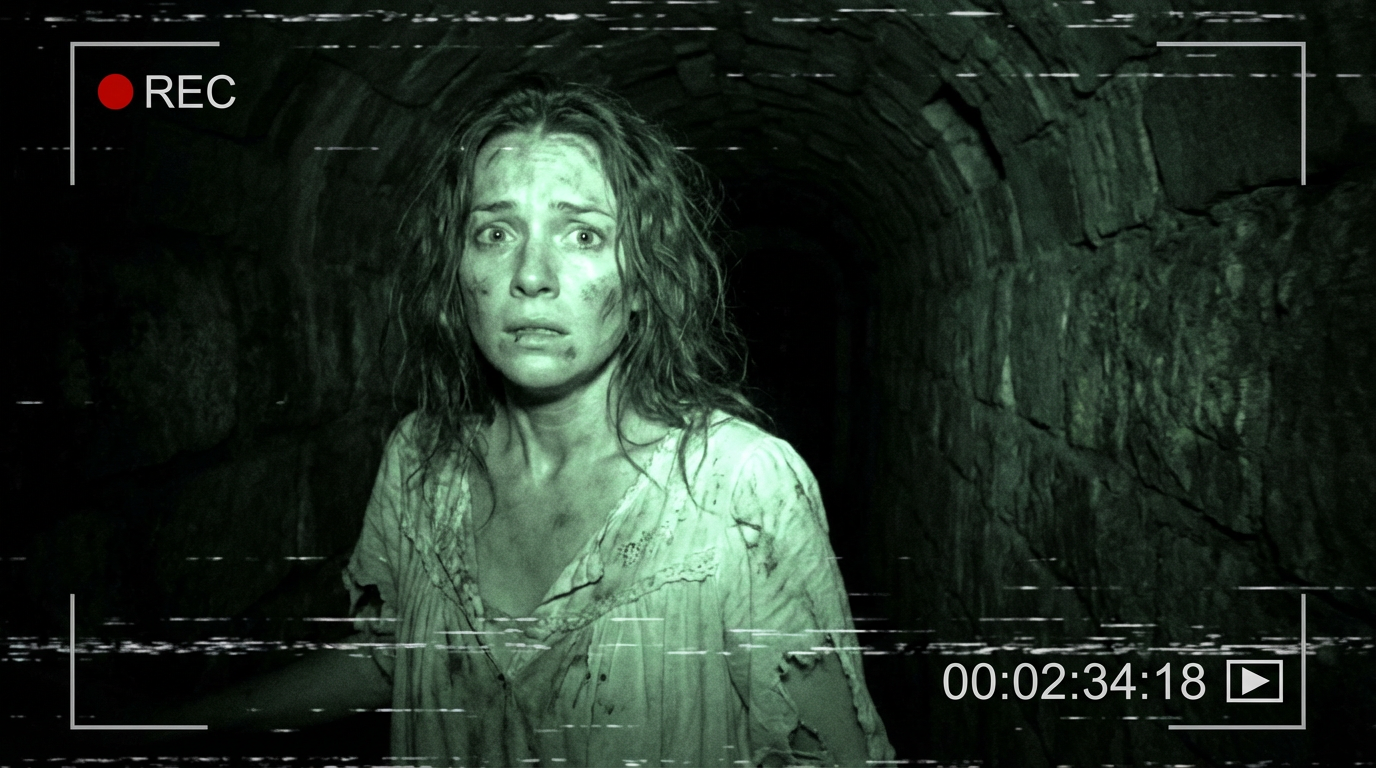
Techniques from the prompt above
Subject and camera: Have your subject look at the camera for immediacy—it sells the POV. Use phrases like "the camera operator's perspective tracking her desperate movement" so the AI understands this is handheld, in-world footage.
Environment: Enclosed spaces work best. "Underground dungeon", "total darkness", and "claustrophobic framing" create the trapped feeling real found footage delivers.
Character state: Physical distress reads clearly. Include "face streaked with grime and fear", "disheveled hair", and "vintage nightgown torn and dirt-stained" so the model knows this is a victim mid-flight.
Night vision: For the classic green look, add "eerie green night vision monochrome". That phrase alone drives much of the found-footage vibe.
Tape artifacts: Include "REC text indicator" and "analog tape degradation" to get scan lines, color bleed, and the VHS feel without over-specifying.
Style anchors: End with "handheld shaky footage", "found footage horror aesthetic", and "35mm aesthetic" so the model locks into the right era and texture.
Tips for better results
- Keep camera movement minimal and shaky
- Add tape noise, dropouts, and color bleed
- Pace the reveal slowly
- Use "claustrophobic framing" when the scene is tight and enclosed
Ready to build your next horror project?
Join the Discord: https://discord.gg/r93kwVHPmq
Sign up: https://darkframe.ai/signup